I used to have an amazing job where my role was to find ways to make technology work for teachers: to improve their practice, to deepen their understanding and, more practically, to save them time. If you can save a teacher 1 minute a day, then scale that to a month, and then across your school, you suddenly have hours of extra time to give to students (teachers rarely spend that saved time on themselves).
Unfortunately, a new tech director took a different direction for the IT department. But this led me to start working on the chatOAME project – again, an opportunity to help teachers to improve their practice, to deepen their understanding and, more practically, to save them time.
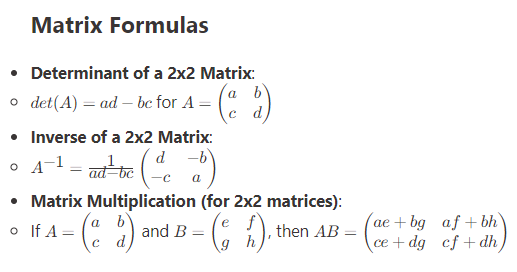
Almost from the beginning, chatOAME was able to generate a Word document or Google Doc from the conversation the teacher had with the AI — button are on the bottom of the page in case you hadn’t notice! But it took a while before I was able to ensure that the mathematics generated in the conversation appeared as editable mathematical equations in Word. That was NOT easy.

It’s important that teachers are able to change and format the mathematics in a way that it easy. The way ChatGPT and many other AIs do it is to use typing characters for the mathematics, but it looks bad, and it can make it confusing for students to interpret it properly. By using the Word Equation Editor, teachers and their students get the exact mathematical representation … and teachers and students can edit it if needed.

At the moment, I haven’t found a solution for Google Docs; Google doesn’t do math well at all, so teachers have to use a Chrome Extension to see the correct mathematics. If anyone out there has a solution, I’m happy to hear from you!
Well, a teacher mentioned yesterday that while it was nice to have the Word document of the discussion, sometime, you just want the single reply (which may be a discussion of pedagogy, a rubric, an FNMI perspective, or a simple worksheet). A bit of coding later and we now have a Word button on every reply, so that if they just want a small bit, they can get that. Time saved – no having to remove extraneous discussion, text or equations and you get only what you need.

This is thanks in large part to the accelerated process of having AI as a coding partner. I’m a self-trained programmer and only do it for tasks I’m interested in, so there’s a large learning curve. But having AI allows me to question methods, processes and algorithms and test them quickly in ways and at a speed that wasn’t possible before. Time saved.